
Russian warship - idi nakhui!
Products:The latest news: |
Screenshots of 4t Tray MinimizerMinimize to tray
You can minimize to tray such well-known applications as Outlook, Outlook Express, Internet Explorer, Firefox, Chrome, Thunderbird, Sunbird and others. Additional titlebar buttons and additional menu items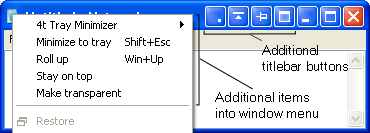
Additional title bar buttons: Minimize to tray, Roll up/down, Stay on top and Make transparent. These buttons are customizable - you can set up their order or turn off any of them. Additional items into taskbar menu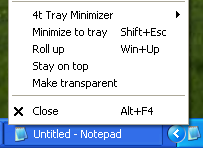
Ability to Hide the whole system tray
4t Tray Minimizer can hide the system tray icons to let you easily read the buttons on your taskbar. To make the system tray reappear, simply place the mouse cursor at the edge of the task bar, where the system tray is hidden. 4t Tray Minimizer menu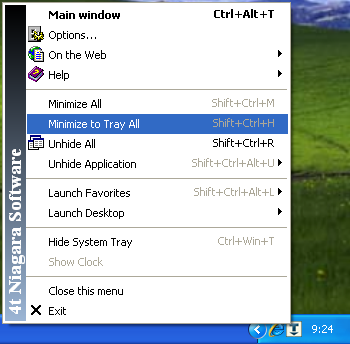
With pop up menu or hot keys you can easy Minimize to tray all applications, Restore all application, launch a shortcut on your Desktop, etc. Roll up/Roll down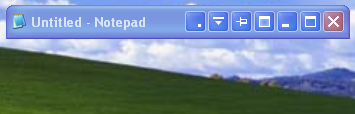
Make transparent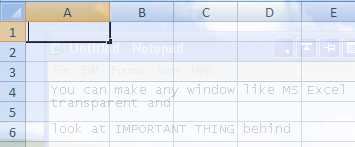
Permanent tray icon and its pop up menu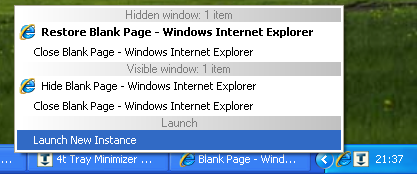
|
Current version: 6.07Setup size: 1.85 Mb Released: 8 Aug, 2017 System requirements:
4t Tray Minimizer Free 6.07: |
Copyright © 2001-2026. 4t Niagara Software. Designed by Holbi. All rights reserved. Privacy | Terms

